DashboardBuilder vs Power BI (2026 Comparison Guide)
TL;DR: DashboardBuilder is a lightweight, self-hosted and on-premises friendly dashboard tool designed for quick setup, customization, and cost-effectiveness. Power BI, on the other hand, is a full enterprise-grade analytics platform with deep integrations in the Microsoft ecosystem. If you want flexibility, ownership, and simplicity, DashboardBuilder is ideal; if you need enterprise-scale features, Power BI may be the better fit.
Introduction
Business Intelligence (BI) tools in 2025 are critical for organizations that want to make data-driven decisions. With so many options available, direct comparisons help teams understand trade-offs in cost, deployment, usability, and integrations. This guide compares DashboardBuilder and Microsoft Power BI to help you decide which tool best fits your needs.
Overview of DashboardBuilder
DashboardBuilder is a flexible dashboard creation tool that allows businesses to design interactive dashboards without heavy setup or licensing costs. It supports multiple deployment options including on-premises, desktop, and cloud, giving teams full control over where their data and applications reside. With its drag-and-drop designer and built-in SQL query builder, users can connect directly to a variety of data sources such as MySQL, MS SQL, PostgreSQL, and Oracle. The generated dashboards can be seamlessly embedded into PHP applications or exported as universal HTML for wider compatibility.
Overview of Power BI
Microsoft Power BI is a leading enterprise-grade business intelligence platform that integrates deeply with the Microsoft ecosystem, including Excel, Azure, and Office 365. It is designed for organizations that need advanced analytics, real-time reporting, and enterprise governance features. Power BI offers strong data modeling, AI-powered insights, and a large collection of built-in connectors to almost every major business data source. Its cloud-first approach makes it ideal for enterprises that already rely on Microsoft tools and want a scalable analytics solution with broad adoption across business units.
Feature Comparison
DashboardBuilder and Power BI both serve the purpose of turning data into insights, but they differ in scope and usability. DashboardBuilder is designed to be lightweight, affordable, and easy to deploy across cloud, desktop, or on-premises setups, making it ideal for quick, customizable dashboards without a steep learning curve. Power BI, on the other hand, offers a more feature-rich, enterprise-level solution with advanced analytics and deep integration into the Microsoft ecosystem, but it comes with higher costs and a steeper learning curve. The table below highlights their differences side by side.
| Feature | DashboardBuilder | Power BI |
|---|---|---|
| Deployment | Available as Cloud, Desktop, and On-Premises installation. Users have full flexibility to host it on their own infrastructure. | Primarily Cloud-based (Power BI Service), with Desktop app for authoring and Premium options for enterprise on-premises deployment. |
| Ease of Use | Simple drag-and-drop dashboard builder, designed for quick setup without steep learning curves. | Feature-rich but more complex, requiring training and familiarity with Microsoft BI stack. |
| Pricing | One-time license with affordable plans starting from free download version, no recurring heavy subscription costs. | Subscription-based, starting from Power BI Pro ($10–$20 per user/month) with Premium costing significantly more. |
| Integrations | Direct connections to MySQL, MS SQL, Oracle, PostgreSQL, and can embed in any PHP or HTML application. | Hundreds of prebuilt connectors, especially strong with Microsoft apps (Excel, Azure, Dynamics 365, Teams). |
| AI/NLP Features | Supports AI-powered natural language query to generate dashboards and charts instantly. | Includes Microsoft Copilot AI integration, Q&A natural language queries, and predictive insights. |
Pros and Cons
DashboardBuilder Pros
- Lightweight and easy to set up, no enterprise-scale overhead.
- One-time purchase option with no costly recurring subscriptions.
- Can be embedded seamlessly into PHP-based applications.
- Works offline or online, giving deployment flexibility.
DashboardBuilder Cons
- Smaller ecosystem compared to Power BI, fewer out-of-the-box connectors.
- Best suited for SMBs and developers rather than very large enterprise BI governance needs.
Power BI Pros
- Strong enterprise adoption with deep integration into Microsoft ecosystem.
- Large library of connectors and strong support for big data sources.
- Advanced analytics, machine learning, and AI-powered insights.
- Continuous updates and community support from Microsoft.
Power BI Cons
- Subscription costs add up quickly, especially at enterprise scale.
- Steeper learning curve, often requiring Power Users or IT support.
- Heavy reliance on Microsoft ecosystem; less flexible for standalone or non-Microsoft environments.
Best For (Use Cases)
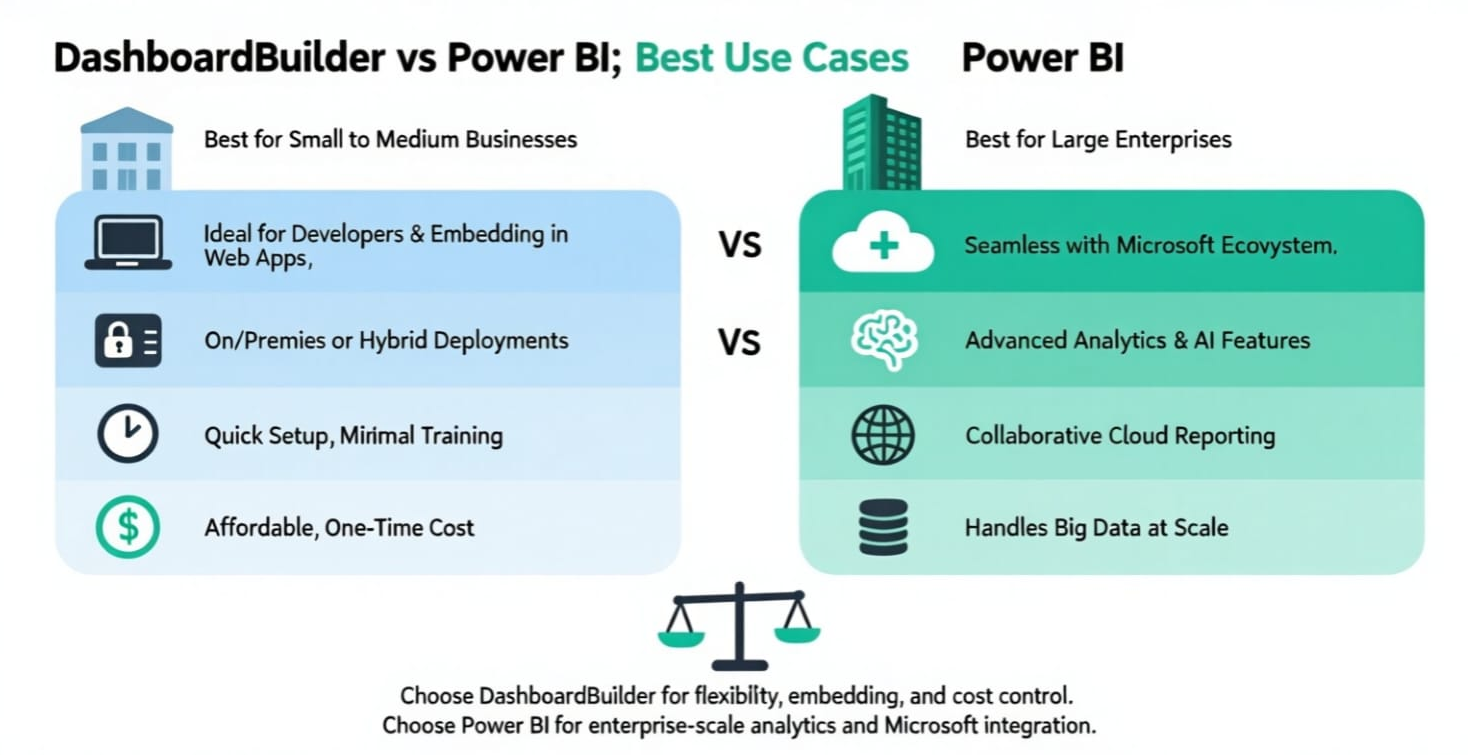
While both DashboardBuilder and Power BI serve the purpose of turning raw data into actionable insights, they are designed with different audiences and scenarios in mind. Choosing between them depends on your business size, technical environment, and long-term strategy.
When to Use DashboardBuilder
- Small to Medium Businesses (SMBs): Ideal for companies that need powerful dashboards without the heavy cost of enterprise software licensing.
- Custom Web Applications: Perfect for developers who want to embed dashboards directly into their PHP, HTML, or web applications without relying on third-party cloud hosting.
- On-Premises or Hybrid Environments: A strong choice for organizations that require full control of their data on their own servers due to compliance or security policies.
- Quick Setup Needs: Works well for businesses that need fast, drag-and-drop dashboards without lengthy onboarding or training.
- Cost-Conscious Deployments: Best for teams that prefer a one-time purchase option rather than recurring per-user subscription fees.
- Developers & IT Teams: Especially useful for IT professionals or software vendors who need to integrate customizable dashboards into client-facing systems.
When to Use Power BI
- Large Enterprises: Designed for organizations that already use Microsoft products like Azure, Office 365, and Dynamics, making integration seamless.
- Advanced Analytics: Best suited for teams that need machine learning, AI-driven insights, and advanced data modeling capabilities.
- Cross-Departmental Reporting: Strong choice for large organizations where multiple departments need standardized BI tools and governance controls.
- Big Data Scenarios: Handles very large datasets with ease, connecting to a wide range of data sources including cloud-based data lakes.
- Collaborative Reporting: Useful when different stakeholders (executives, analysts, operational teams) need shared access to reports and dashboards in the cloud.
- Global Teams: Great for multinational companies that rely on cloud-based collaboration and need scalability across hundreds or thousands of users.
In summary, DashboardBuilder is best for developers, SMBs, and organizations that need affordable, embeddable, and flexible dashboards, while Power BI is better suited for enterprises with advanced analytics needs and heavy reliance on the Microsoft ecosystem. Both tools are powerful, but their best use cases differ based on scale, complexity, and integration needs.
Conclusion
Both DashboardBuilder and Power BI are powerful business intelligence tools, but they cater to different needs. DashboardBuilder shines when you need a lightweight, affordable, and flexible solution that can be deployed on-premises, in the cloud, or embedded into custom applications. On the other hand, Power BI is better suited for enterprises deeply invested in the Microsoft ecosystem and looking for advanced analytics, AI-driven insights, and large-scale collaboration. The right choice depends on your priorities—whether you value simplicity and cost-effectiveness or enterprise-grade features and ecosystem integration.
FAQs
Which is easier to use, DashboardBuilder or Power BI?
DashboardBuilder is generally easier to use for beginners, thanks to its simple drag-and-drop interface and lightweight design. Power BI offers more features but comes with a steeper learning curve, especially for users unfamiliar with Microsoft tools.
Does DashboardBuilder integrate with Excel/SQL?
Yes. DashboardBuilder supports direct connections with Excel, CSV, MySQL, SQL Server, Oracle, and other popular databases, making it easy to visualize data from existing systems.
Is Power BI free?
Power BI offers a free desktop version with limited sharing capabilities. For collaboration, advanced analytics, and enterprise deployment, you’ll need a paid plan such as Power BI Pro or Power BI Premium.
Which is better for startups, DashboardBuilder or Power BI?
Startups often prefer DashboardBuilder because of its affordable pricing, flexibility, and quick deployment options. However, if the startup already relies heavily on Microsoft tools like Azure, Excel, or Teams, then Power BI may be the better long-term fit.
Last updated: August 18, 2025 — Author: Jason Carter